Evaluation Runs
Evaluation Runs allow you to measure and track the performance of your AI workflows against benchmark datasets.
Overview
The Evaluation Run page provides detailed information about a workflow's performance on a specific dataset:
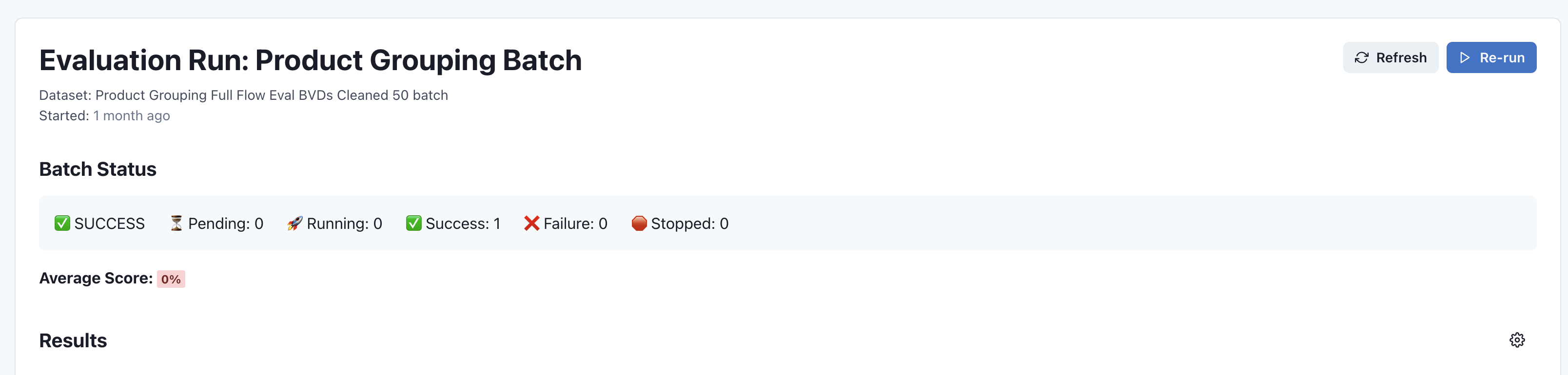
Run Information
At the top of the page, you'll find key information about the evaluation run:
- Run name and workflow identification
- Dataset used for evaluation
- Start time and execution details
- Action buttons for refreshing data or re-running the evaluation
Batch Status
The Batch Status section provides an at-a-glance summary of the evaluation results:
- SUCCESS: Overall status of the evaluation run
- Pending: Number of entries waiting to be processed
- Running: Number of entries currently being processed
- Success: Number of successfully completed entries
- Failure: Number of entries that encountered errors
- Stopped: Number of entries manually stopped during execution
Average Score
For evaluations that generate numeric scores, the Average Score section shows the overall performance metric across all evaluated entries. This may be displayed as:
- Percentage (e.g., 95%)
- Numeric scale (e.g., 4.2/5)
- Pass/fail ratio
Results
The Results section displays detailed outcomes for each entry in the dataset, including:
- Input data used for evaluation
- Expected outputs (reference data)
- Actual outputs from your workflow
- Individual scores or pass/fail status
- Execution times and resource usage
Filtering and Sorting
You can analyze evaluation results by:
- Filtering by status (success, failure, etc.)
- Sorting by score or execution time
- Searching for specific inputs or outputs
- Comparing results across different evaluation runs
Actions
From the Evaluation Run page, you can:
- Refresh: Update the page with the latest evaluation data
- Re-run: Execute the evaluation again with the same parameters
- Open Workflow: Navigate to the workflow that was evaluated
- View Dataset: View the dataset used for the evaluation
- Export Results: Download the evaluation results for offline analysis
Understanding Results
Evaluation results help you:
- Identify strengths and weaknesses in your workflow
- Track performance improvements over time
- Compare different workflow versions
- Make data-driven decisions about model selection
- Detect regressions in workflow performance
Next Steps
- View Evaluation Datasets - Manage your test datasets
- Workflow Details - Return to workflow information
- Return to Dashboard